Digital marketing has changed dramatically over the last few years. Privacy updates, ad blockers, browser restrictions, and cookie limitations are making it harder for businesses to track conversions accurately.
Many businesses are losing valuable customer data without even realizing it. This leads to inaccurate analytics, poor ad optimization, lower ROI, and wasted marketing budgets.
This is where Google Tag Gateway and server-side tracking become extremely important.
In this guide, we will explain:
- What Google Tag Gateway is
- How server-side tracking works
- Why businesses are switching to first-party tracking
- Benefits for SEO, ads, and analytics
- How Palam Solutions can help implement advanced tracking systems
What is Google Tag Gateway?
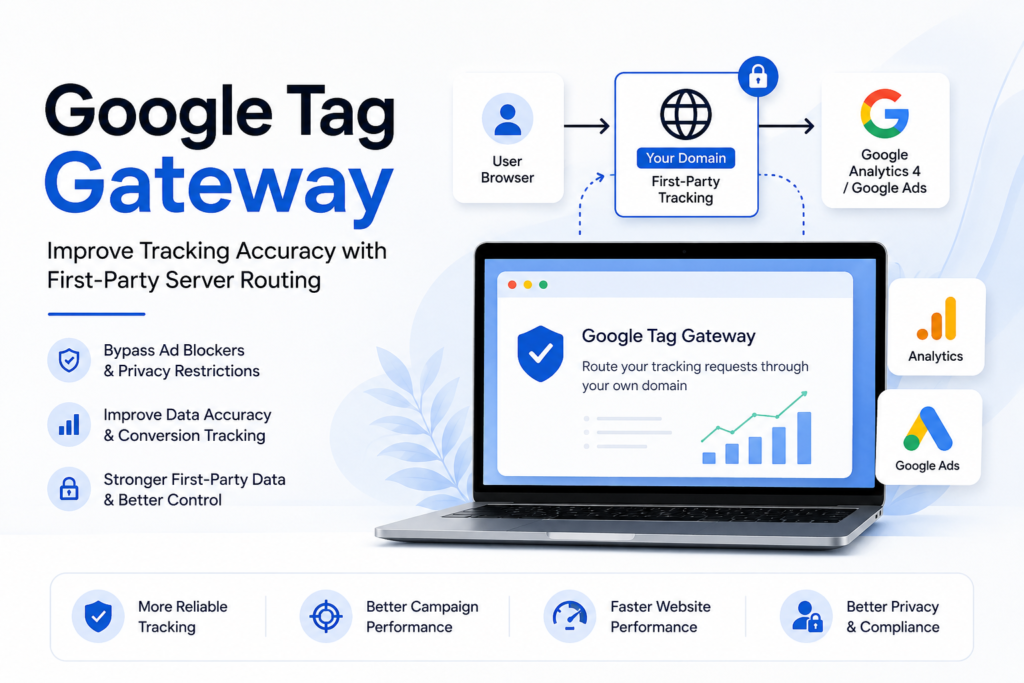
Google Tag Gateway is part of Google’s server-side tagging ecosystem that helps businesses route tracking requests through their own domain instead of directly through third-party tracking domains.
Traditionally, tracking works like this:
Visitor Browser → Google Analytics / Facebook / Ads
With Google Tag Gateway and server-side tracking:
Visitor Browser → Your Domain → Analytics Platforms
For example, instead of loading tracking requests from:
google-analytics.com
Businesses can use:
analytics.yourdomain.com
This creates a more reliable first-party tracking environment.
Why Traditional Tracking is Becoming Less Reliable
Modern browsers and privacy updates increasingly block third-party tracking scripts and cookies.
Some major changes affecting tracking include:
- iOS privacy updates
- Safari Intelligent Tracking Prevention
- Chrome privacy changes
- Ad blockers
- Cookie restrictions
- GDPR and consent regulations
As a result, businesses often lose:
- Conversion tracking accuracy
- Lead attribution data
- Retargeting audiences
- Campaign optimization signals
- User journey insights
This directly affects marketing performance.
What is Server-Side Tagging?
Server-side tagging moves part of your tracking infrastructure from the browser to your own secure server environment.
Instead of sending data directly from the user’s browser to analytics platforms, the data first goes through your own server container.
This allows:
- Better control over tracking data
- Improved privacy handling
- Faster website performance
- More reliable conversion tracking
- Reduced impact from ad blockers
Server-side tagging is commonly implemented using:
- Google Tag Manager Server Container
- Google Cloud Run
- Stape Hosting
- First-party tracking domains
Key Benefits of Google Tag Gateway
1. Improved Tracking Accuracy
One of the biggest benefits is better data collection accuracy.
Businesses can recover lost tracking signals caused by:
- Browser privacy restrictions
- Ad blockers
- Cookie limitations
This helps improve:
- Google Ads conversion tracking
- Facebook Ads attribution
- GA4 event tracking
- Lead generation measurement
2. Better Ad Performance
Advertising platforms rely heavily on accurate conversion data.
When tracking breaks:
- Campaign optimization suffers
- CPA increases
- ROAS decreases
Server-side tracking helps platforms receive cleaner conversion signals, improving campaign performance and optimization.
3. First-Party Data Collection
First-party tracking is becoming the future of digital analytics.
By routing data through your own domain:
- Browsers trust requests more
- Tracking reliability improves
- Attribution becomes more accurate
This creates a stronger marketing data foundation.
4. Faster Website Performance
Traditional tracking often loads multiple heavy scripts directly in the browser.
Server-side tagging can reduce:
- JavaScript execution
- Third-party requests
- Page load delays
This can improve:
- Core Web Vitals
- User experience
- SEO performance
5. Better Privacy & Data Control
Businesses gain more control over:
- Which data is shared
- How data is processed
- Consent management
- Data filtering
This helps businesses align better with modern privacy requirements.
Google Tag Gateway vs Traditional GTM
| Feature | Traditional GTM | Server-Side GTM + Tag Gateway |
|---|---|---|
| Tracking Reliability | Moderate | High |
| Ad Blocker Resistance | Low | Better |
| Data Control | Limited | Advanced |
| First-Party Tracking | No | Yes |
| Performance | Moderate | Better |
| Privacy Compliance | Basic | Improved |
Who Should Use Google Tag Gateway?
Google Tag Gateway is especially valuable for:
Ecommerce Businesses
Track purchases and ad conversions more accurately.
Lead Generation Companies
Improve attribution for form submissions and calls.
SaaS Businesses
Measure signup and subscription events reliably.
Agencies
Provide advanced analytics solutions for clients.
Businesses Running Paid Ads
Improve campaign optimization using cleaner data.
Common Use Cases
Businesses commonly use server-side tracking for:
- Google Analytics 4 (GA4)
- Meta Conversion API
- Google Ads Enhanced Conversions
- TikTok Events API
- CRM integrations
- Lead tracking systems
- Ecommerce event tracking
- Call tracking
- Funnel analytics
Challenges Businesses Face Without Proper Tracking
Many businesses experience:
- Missing conversions
- Incorrect attribution
- Underreported ad performance
- Broken analytics
- Inaccurate ROI reporting
- Poor retargeting audiences
Without reliable data, marketing decisions become less effective.
Challenges Businesses Face Without Proper Tracking
Many businesses experience:
- Missing conversions
- Incorrect attribution
- Underreported ad performance
- Broken analytics
- Inaccurate ROI reporting
- Poor retargeting audiences
Without reliable data, marketing decisions become less effective.
How Google Tag Gateway Works
Google Tag Gateway for advertisers helps businesses route tracking requests such as Google Analytics 4 (GA4) and Google Ads conversions through their own first-party domain instead of sending data directly to Google servers.
This approach helps reduce data loss caused by:
- Ad blockers
- Browser privacy restrictions
- Tracking prevention tools
- Cookie limitations
Unlike a complete server-side Google Tag Manager (GTM) setup, Google Tag Gateway provides a simpler and more cost-effective way to improve tracking reliability without requiring complex infrastructure management.
For many businesses, this creates a practical middle ground between traditional browser-based tracking and advanced server-side tagging systems.
Requirements Before Setup
Before configuring Google Tag Gateway, businesses should ensure:
- A standard Google Tag or GTM Web Container is already installed on the website
- The website uses a supported CDN or Load Balancer
- Administrator access is available for both Google Tag Manager and the CDN platform
Popular supported infrastructure platforms include:
- Cloudflare
- Google Cloud Load Balancer
- Fastly
- Akamai
Option 1: Setup with Cloudflare (Recommended)
Cloudflare currently provides one of the easiest ways to enable Google Tag Gateway because of its direct integration with Google.
The setup process can usually be completed in just a few clicks.
Step 1: Configure Inside Google Tag Manager
Inside Google Tag Manager:
- Open your Web Container
- Navigate to:
Admin → Google Tag Gateway
Google will automatically generate a unique measurement path for your website such as:
- /metrics
- /a/g/c
This path will be used to route tracking requests through your own domain.
After reviewing the measurement path, click:
“Sign into Cloudflare”
Step 2: Authorize Cloudflare Access
Google will request permission to configure edge routing rules inside your Cloudflare account.
Once authorized:
- Select the domains you want to enable
- Confirm the configuration
- Publish your GTM container
After activation, tracking requests will begin routing through your own first-party domain automatically.
Cloudflare users can also enable this feature directly from the Cloudflare dashboard by entering their Google Tag ID.
Option 2: Setup with Google Cloud Load Balancer
Businesses already using Google Cloud Platform can configure Google Tag Gateway using an external Application Load Balancer.
The process includes:
- Accessing Google Tag settings
- Selecting Google Cloud Load Balancer as the network option
- Choosing the correct Google Cloud project
- Confirming the measurement path
- Completing automatic backend routing configuration
This setup allows Google Cloud infrastructure to securely proxy tracking requests through the business’s own domain environment.
Option 3: Setup with Fastly, Akamai, or Custom Infrastructure
For businesses using platforms such as:
- Fastly
- Akamai
- NGINX reverse proxy environments
…the setup process requires manual reverse proxy configuration.
This generally involves:
- Creating a dedicated tracking path on the website
- Configuring routing rules at the CDN edge
- Allowing POST requests
- Bypassing caching or redirect conflicts
- Forwarding requests to Google’s tracking endpoints
The website’s tracking scripts or GTM configuration must also be updated to use the new first-party tracking path instead of the default Google Tag Manager domain.
While this setup is more technical, it provides greater flexibility for enterprise environments.
How to Verify the Setup
After configuration, businesses should test whether tracking requests are properly routing through the first-party domain.
This can be verified using browser developer tools.
Testing Steps
- Open the website
- Launch Browser Developer Tools
- Navigate to the Network tab
- Refresh the page
- Search for the custom measurement path
A successful setup should show:
- Tracking requests using your own domain
- Status code 200 OK
- Successful event payload delivery
Businesses can also use GTM Tag Assistant Preview Mode to confirm that analytics hits are being routed correctly.
How Palam Solutions Can Help
At Palam Solutions, we help businesses implement advanced analytics and tracking systems designed for modern privacy-focused environments.
Our services include:
-
Google Tag Manager Setup
Professional GTM implementation and optimization.
-
Server-Side Tagging
Setup of secure server-side GTM environments.
-
Google Tag Gateway Configuration
First-party tracking domain setup for better data reliability.
-
GA4 Event Tracking
Custom event and conversion tracking implementation.
-
Meta Conversion API Setup
Improve Facebook Ads attribution and conversion accuracy.
-
Google Ads Enhanced Conversions
Better conversion matching and campaign optimization.
-
Consent Mode V2 Setup
Privacy-compliant analytics and ad tracking implementation.
-
Funnel & Lead Tracking
Track customer journeys and lead generation performance accurately.
Final Thoughts
As privacy regulations and browser restrictions continue to evolve, businesses can no longer rely only on traditional client-side tracking.
Google Tag Gateway and server-side tagging provide a smarter, more future-ready analytics solution that helps businesses improve tracking accuracy, protect marketing performance, and build stronger first-party data systems.
Companies that invest in modern tracking infrastructure today will have a significant advantage in analytics, advertising, and customer insights moving forward.
Need Help Setting Up Google Tag Gateway?
Palam Solutions helps businesses implement Google Tag Gateway, server-side tracking, GA4 event tracking, GTM setup, and advanced conversion tracking systems for better analytics and marketing performance.